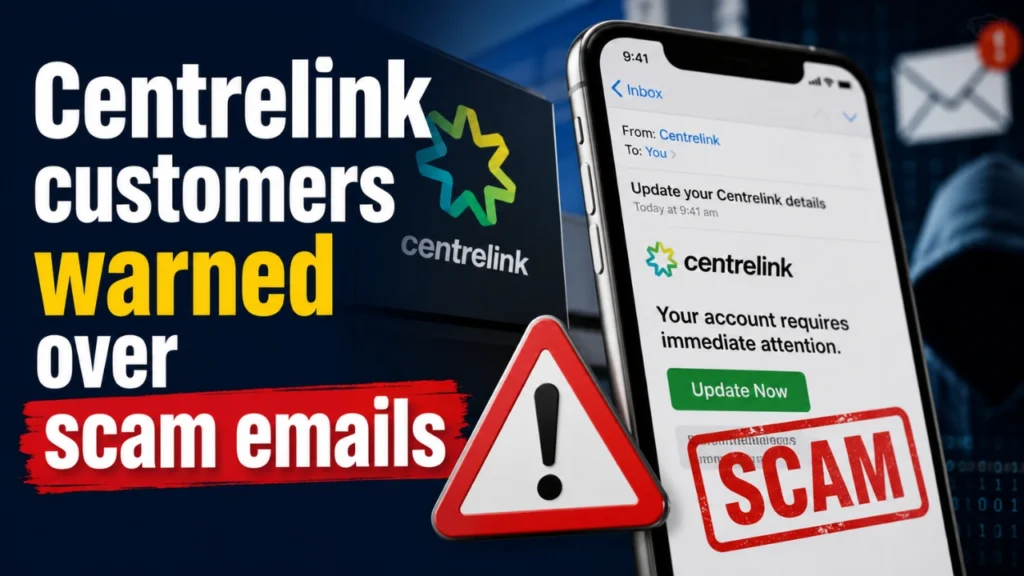
Services Australia has issued a fresh warning to Centrelink customers about a wave of scam emails designed to look like official government correspondence. The fraudulent messages are being sent to trick recipients into believing their payments are at risk, pushing them to click on malicious links and hand over sensitive personal and financial information.
With millions of Australians relying on Centrelink for pensions, JobSeeker, family payments, and other support, scammers see the platform as a prime target. Here’s a full breakdown of how the scam works, why it’s so convincing, and the steps you can take to protect yourself.
How the Scam Works
The scam typically begins with an email that appears to come from Centrelink or Services Australia. It uses official-looking logos, formatting, and language to seem legitimate. The message usually claims there is a problem with the recipient’s account — most commonly that their details need to be “urgently updated” or their payment will be suspended, delayed, or cancelled.
This sense of urgency is deliberate. By creating fear that a payment might stop, scammers pressure people into acting quickly without stopping to check whether the email is genuine.
Inside the email is a link that, once clicked, leads to a fake website built to closely resemble the real myGov or Centrelink login page. Victims who enter their username, password, or personal details on this fake page are effectively handing that information directly to criminals. In some versions of the scam, the email also asks recipients to open and “sign” a digital document, which can be used to harvest further personal data or install malicious software.
Once scammers have this information, they can potentially access a victim’s real myGov account, redirect Centrelink payments, apply for loans or payment plans in the victim’s name, or use stolen identity details for further fraud.
Why This Scam Is Hard to Spot
Several factors make these emails more convincing than the average phishing attempt:
- Timing — Scammers often send these emails around the same time as genuine Centrelink updates, indexation changes, or payment schedule adjustments, making the fake message blend in with real news.
- Branding — The emails copy government colour schemes, logos, and formal language closely enough to fool a quick glance.
- Emotional pressure — Threatening language about suspended payments taps directly into financial anxiety, which is especially effective given how many recipients depend on their payments for essential living costs.
- Fake but convincing links — The URLs used often mimic the real myGov domain closely enough that they don’t look obviously wrong at first glance.
Services Australia has been clear on one key point: it will never send a link asking customers to sign in to their myGov or Centrelink online account, and it will never send a link asking someone to sign a digital document. Any email that does this should be treated as suspicious immediately.
Data Snapshot: Centrelink Scam Emails at a Glance
| Detail | Information |
|---|---|
| Type of scam | Phishing email impersonating Centrelink/Services Australia |
| Main tactic | False claims that payments will be suspended unless details are “updated” |
| Goal of scammers | Steal myGov login details, personal identity information, and banking data |
| Delivery method | Email (some variants also use SMS) containing a link to a fake myGov-style page |
| Red flag phrase | “Urgently update your details” or “your payment will be suspended” |
| Official Services Australia policy | Will never send a login link via email or text |
| Where to verify payments | Only the official myGov app or servicesaustralia.gov.au |
| Where to report a scam email | reportascam@servicesaustralia.gov.au |
| Who to contact if you clicked a link | Services Australia’s Scams and Identity Theft Helpdesk |
How to Protect Yourself
Avoiding this scam largely comes down to a few consistent habits:
- Never click login links in emails or texts. Instead, open a new browser tab and type servicesaustralia.gov.au or go directly to the official myGov app.
- Check the sender’s email address carefully. Scam emails often come from addresses that look similar to, but not exactly the same as, official government domains.
- Slow down when a message creates urgency. Genuine government correspondence rarely demands instant action under threat of losing a payment.
- Look for spelling and formatting inconsistencies. While many scam emails are polished, small errors in grammar, spacing, or logo quality can be a giveaway.
- Enable extra account security. Adding multi-factor authentication to your myGov account makes it much harder for stolen passwords alone to grant access.
- Report suspicious emails. Forwarding scam emails to reportascam@servicesaustralia.gov.au helps authorities track and shut down these campaigns faster.
What to Do If You’ve Already Clicked
If you’ve clicked a link in one of these emails or entered personal details on a suspicious page, acting quickly can limit the damage:
- Change your myGov password immediately from the official app or website, not from any link in the email.
- Contact Services Australia’s Scams and Identity Theft Helpdesk to flag your account for review.
- Monitor your bank accounts and Centrelink payment history for unusual activity.
- Consider a free credit report check to see if your identity details have been used elsewhere.
- Report the incident to Scamwatch, run by the Australian Competition and Consumer Commission (ACCC), to help build a national picture of the scam’s spread.
Centrelink Is Still Chasing Debts Older Than 40 Years — Even After Agreeing to a Six-Year Limit…
Why This Matters for Australians Right Now
Scam losses in Australia have run into the hundreds of millions of dollars in recent years, with phishing emails and fake government portals making up a significant share of reported cases. Centrelink recipients are a particularly attractive target because payments are recurring, essential, and tied to sensitive personal identity data. A successful scam doesn’t just risk a single payment — it can expose a victim’s Medicare details, tax file number, and banking information all at once.
As government services continue to move online, criminals are refining these scams to look more legitimate with each wave. Staying alert, verifying communications through official channels only, and reporting suspicious emails immediately remain the most effective defences available to everyday Australians.
Frequently Asked Questions
1. Will Centrelink ever email me a link to log in to myGov?
No. Services Australia has confirmed it will never send a link asking you to sign in to your myGov or Centrelink online account. Any email that does this should be treated as a scam.
2. How can I tell if a Centrelink email is genuine?
Genuine Centrelink communication won’t pressure you to click a login link or “urgently” update details via email. If in doubt, don’t click anything — log in directly through the official myGov app or servicesaustralia.gov.au to check your account status.
3. What should I do if I already clicked a scam link?
Change your myGov password straight away using the official app or website, contact the Scams and Identity Theft Helpdesk, and keep an eye on your bank accounts for unusual activity.
4. Where do I report a scam email claiming to be from Centrelink?
Forward it to reportascam@servicesaustralia.gov.au, or report it through Scamwatch, the ACCC’s national scam-reporting service.
Centrelink Wipes $22,000 Pension Debt After Admitting It Was a “Human Error”